We've all been there...
You've all probably executed a query on SSMS, and all of a sudden there is a green text index recommendation
Now next we all probably added the index, now what?
We execute the same query AND BAM, INSTANT
Now that looks like a nice feature, but let's go deeper and see the drawback and then how to utilize it better
Drawbacks of blindly following the recommendation
CREATE NONCLUSTERED INDEX [NameOfIndex]
  ON [dbo].[Table] ([Column1],[Column2])
  INCLUDE ([Column3],[Column4],[Column5],[Column6],[Column7],[Column8],[Column9])
This is usually how the index recomendations look, a PERFECT inclusive index for the SPECIFIC query
Now you might ask... why would an inclusive index be bad?
Well we also have to take into account the downside of having indexes
Reads are sped up, but that means we have a new copy of the table sorted to suit our query
Which means each time we do a modification like INSERT, UPDATE, DELETE we also need to update our new copy
Also it's not just the index colums, as you can see here we have a bunch of INCLUDED columns that need to be kept in sync with the main table
Now don't get me wrong, I am all for indexing, but just don't follow the suggestion and call it a day
Let's go into an example
Here is our query generated by Entity Framework
A pretty simple one I might add
SELECT [Table1].[Column1] AS [Alias1],
  [Table1].[Column2] AS [Alias2],
  [Table1].[Column3] AS [Alias3],
  [Table1].[Column4] AS [Alias4],
  [Table1].[Column5] AS [Alias5],
  [Table2].[Column6] AS [Alias6],
  [Table2].[Column7] AS [Alias7],
  [Table2].[Column8] AS [Alias8],
  [Table2].[Column9] AS [Alias9],
  CASE
      WHEN ([Table4].[Column10] IS NULL) THEN
          CAST(NULL AS varchar(1))
      ELSE
          [Table4].[Column11]
  END AS [Alias10],
  CASE
      WHEN ([Table3].[Column12] IS NULL) THEN
          CAST(NULL AS int)
      ELSE
          1
  END AS [Alias11],
  [Table3].[Column13] AS [Alias12],
  [Table3].[Column14] AS [Alias13],
  [Table3].[Column15] AS [Alias14],
  [Table3].[Column16] AS [Alias15]
FROM [dbo].[Table1] AS [Table1]
    INNER JOIN [dbo].[Table2] AS [Table2] ON [Table1].[Column17] = [Table2].[Column18]
    LEFT OUTER JOIN [dbo].[Table3] AS [Table3] ON [Table1].[Column19] = [Table3].[Column20]
    LEFT OUTER JOIN [dbo].[Table4] AS [Table4] ON [Table1].[Column21] = [Table4].[Column22]
WHERE ([Table1].[Column23] IS NULL) AND ([Table1].[Column1] = 100000)
And let's not forget the index we get as suggestion
CREATE NONCLUSTERED INDEX [Table1]
  ON [dbo].[Table] ([Column1],[Column23])
  INCLUDE ([Column17],.....)
Now I added this index and the query is really INSTANT, we are talking 24 logical reads
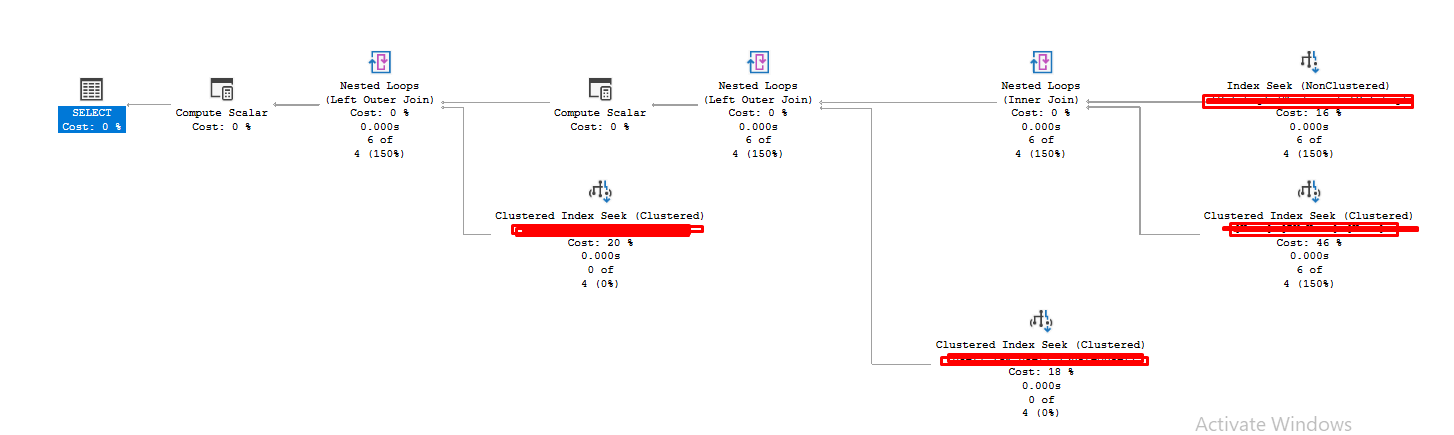
The question is always can we do better?
What if we removed all the INCLUDE columns
Let's try that
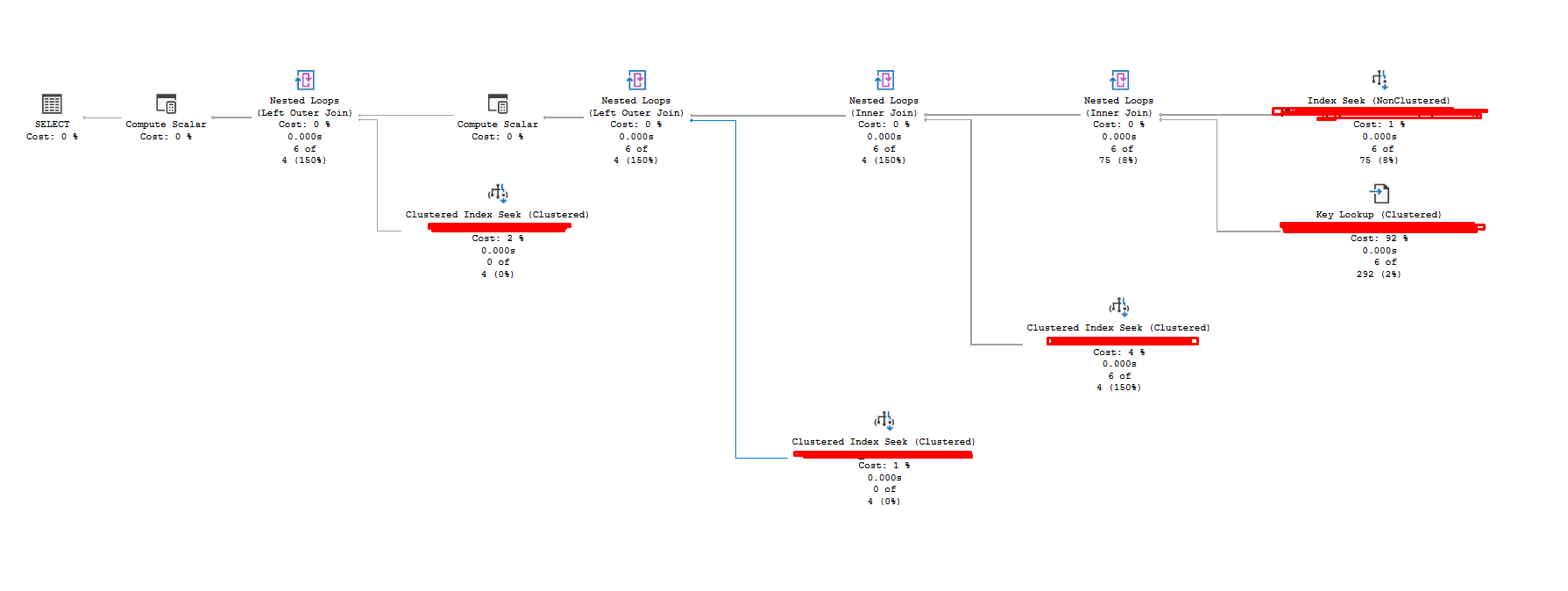
Welp, now there is a key lookup since we removed the INCLUDE and our index is no longer inclusive
The question is .... do we care?
Now here comes the part where knowing our data distribution comes, here is a link to a previous blog post that will get you up to date with that LINK
You can see 6 key lookups, that's basically nothing and now our index looks like this (below). You might wonder why we have a WHERE, we will talk about that in my next blog and how filtered indexes work and where to use them
CREATE NONCLUSTERED INDEX Table1_Filter ON [Table1] ([Column1]) WHERE [Column23] IS NULL
Now you might say, that THIS query with THIS data has 6 key lookups, OK let's see the biggest outlier, again knowing our data
Here is the biggest outlier, 4000 logical reads and 600 lookups, I wouldn't sweat about this. I'd much rather have an index without any INCLUDE and get 4000 logical reads when my WORST case happens then maintain 6-7 INCLUDE colums which may be HOT (frequently updated)
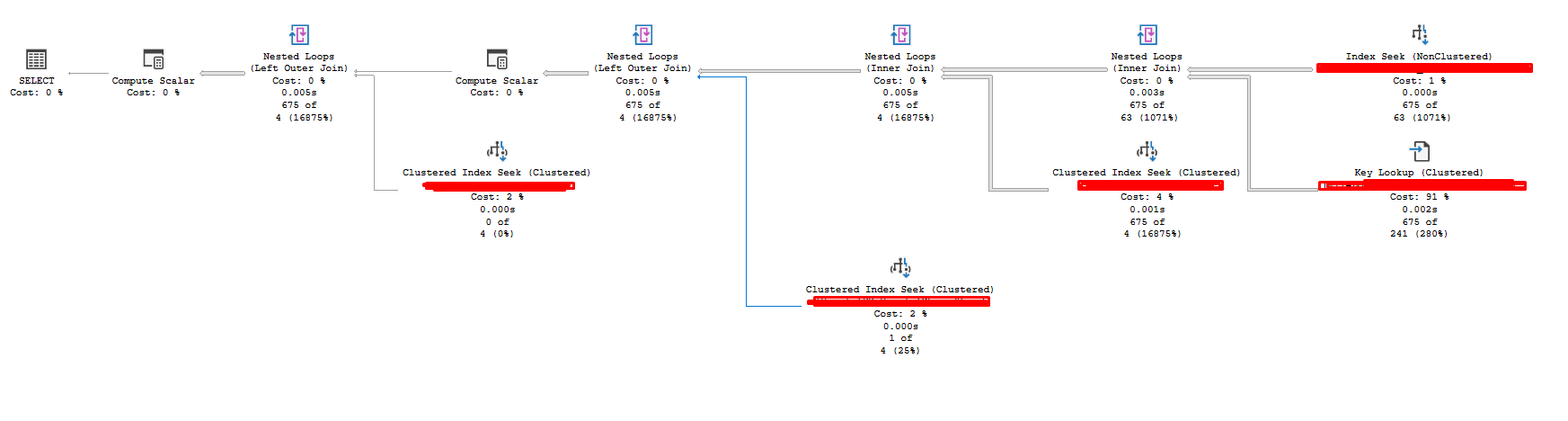
So in summary
- It's not a good idea to follow the sql server suggestion blindly, A GOOD starting point but play around with it
- Always try whether an index is enough without the INCLUDE
- And check for worst case scenarios based on you data distribution